
Contacts are the people and companies your business works with that aren't customers, like suppliers, subcontractors and inspectors. Keep their phone numbers, addresses and notes in one place, so everyone on your team can find them.
Contacts or Customers?
Customers are the people you do jobs for: they have orders, payments and appointments. Contacts are everyone else you deal with to get the work done. A contact has no orders.
Add a Contact
- Open the Contacts menu and choose Add Contact (or press n then t).
- Enter the first name, last name and company. Everything else is optional: address, phone numbers, email, website and social profiles.
- Pick a contact type, like Supplier or Subcontractor, and add a first note if you like.
- Click Add contact.
Find a Contact
Go to Contacts > View Contacts (or press g then t). Search by last name, or click a letter to see every contact whose last name starts with it.
On a Contact's Page
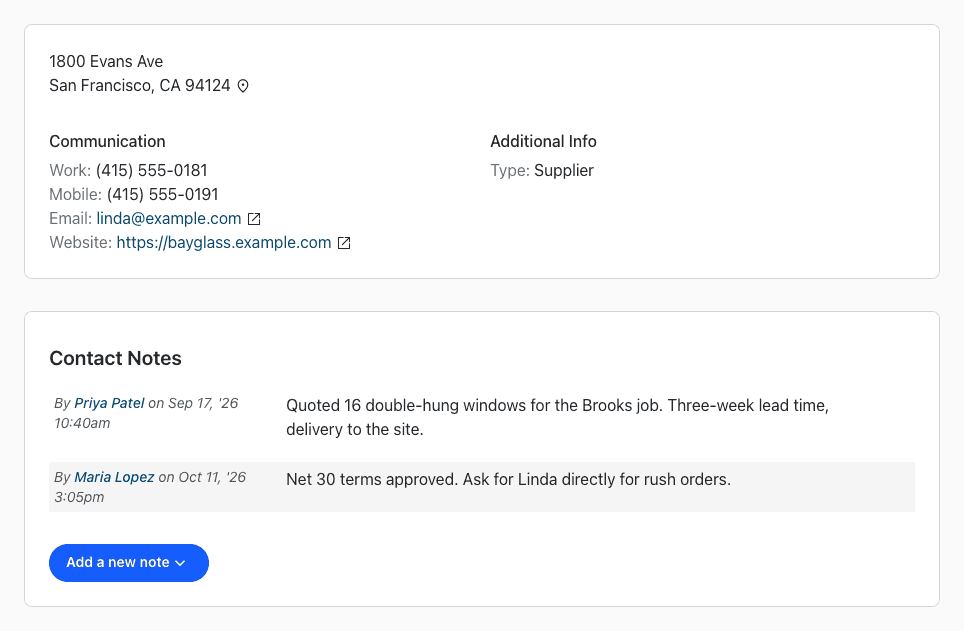
- Address: click the pin next to it for directions.
- Communication: phone numbers, and email and website links.
- Contact Notes: click Add a new note to record quotes, terms or anything worth remembering. Each note shows who wrote it and when.
- Edit or delete: use the pencil or trash icon next to the name (or press e to edit).
To set up your own contact types, see What are contact types?